
Percentage Difference Formula: How to Calculate It
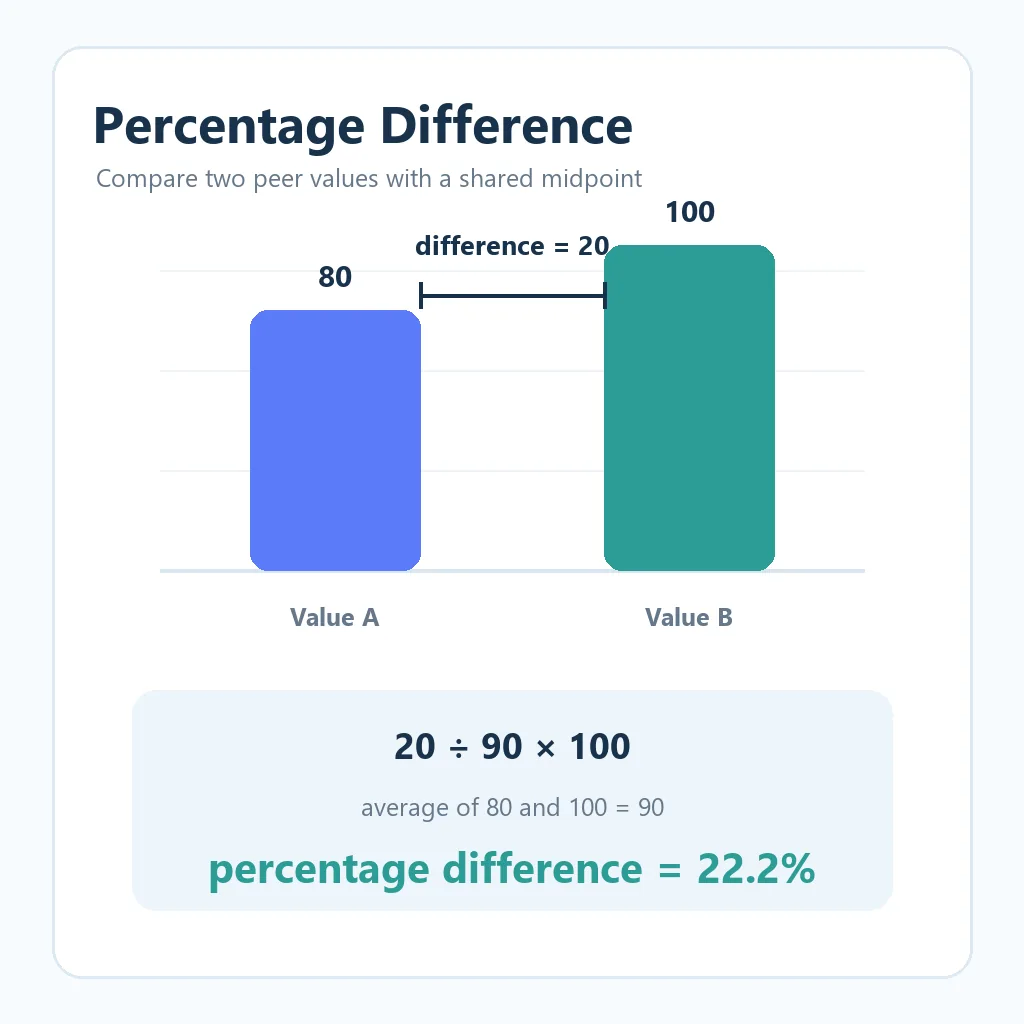
The percentage difference formula compares two values without treating either one as the permanent starting point. Find the absolute difference, divide it by the average of the two values, and multiply by 100. For example, the difference between 80 and 100 is 20, their average is 90, and the percentage difference is 20 ÷ 90 × 100 = 22.2%.
Percentage difference formula at a glance
Percentage difference = |Value A − Value B| ÷ ((Value A + Value B) ÷ 2) × 100. The vertical bars mean use the absolute difference, so the order of the two values does not change the answer.
With 80 and 100, the absolute difference is 20 and the average is 90. The calculation is 20 ÷ 90 × 100 = 22.22%, usually shown as 22.2% when one decimal place is enough.
What percentage difference measures
Percentage difference is a symmetric comparison. It is useful when two measurements are peers and neither should automatically be called the original value. Examples include two lab readings, two quoted prices, two experimental results, two estimates, or the output of two methods that are meant to measure the same thing.
The formula first turns the two numbers into one neutral reference point: their arithmetic mean. Dividing the gap by that mean answers, “How large is the separation compared with the typical size of these two values?” The absolute-value step keeps the result positive and makes 80 versus 100 the same comparison as 100 versus 80.
This is different from simply reporting the difference of 20 units. A raw difference keeps the unit, while a percentage difference expresses the gap relative to both values together. In a report, it is often clearest to show both: “The readings differ by 20 units, or 22.2% of their average.”
How to calculate percentage difference step by step
Use the following order so the denominator stays symmetric and the calculation can be checked by another person.
- Record both values: write Value A and Value B with the same unit and measurement definition.
- Find the absolute difference: subtract one value from the other and ignore the sign.
- Find the average: add the two values and divide the sum by 2.
- Divide the difference by the average: this creates a decimal comparison.
- Convert to a percentage: multiply by 100 or format the decimal as a percentage.
For A = 40 and B = 60, the absolute difference is 20. The average is (40 + 60) ÷ 2 = 50. Therefore, 20 ÷ 50 × 100 = 40%. Reversing the inputs produces the same 40%, which is why this method is appropriate for a peer comparison.
Keep full precision until the last step. If you round the average or difference too early, the displayed result may drift. Also write down whether the values are prices before tax, measurements at a particular time, or values from different methods; a mathematically correct comparison can still be misleading when the inputs are not comparable.
Percentage difference examples
The examples below show how the same formula behaves with prices, measurements, and larger values. The unit and the rounding choice should be included in the final report.
| Value A | Value B | Difference | Average | Percentage difference |
|---|---|---|---|---|
| $80 | $100 | $20 | $90 | 22.2% |
| 40 units | 60 units | 20 | 50 | 40% |
| 1,200 ms | 1,260 ms | 60 ms | 1,230 ms | 4.9% |
| 2.4 kg | 2.8 kg | 0.4 kg | 2.6 kg | 15.4% |
For the timing example, 60 ÷ 1,230 × 100 is approximately 4.878%, which rounds to 4.9%. For the weight example, 0.4 ÷ 2.6 × 100 is approximately 15.385%, which rounds to 15.4%. Showing the unrounded inputs lets readers reproduce the result even when the published percentage is rounded.
Percentage difference vs. percentage change
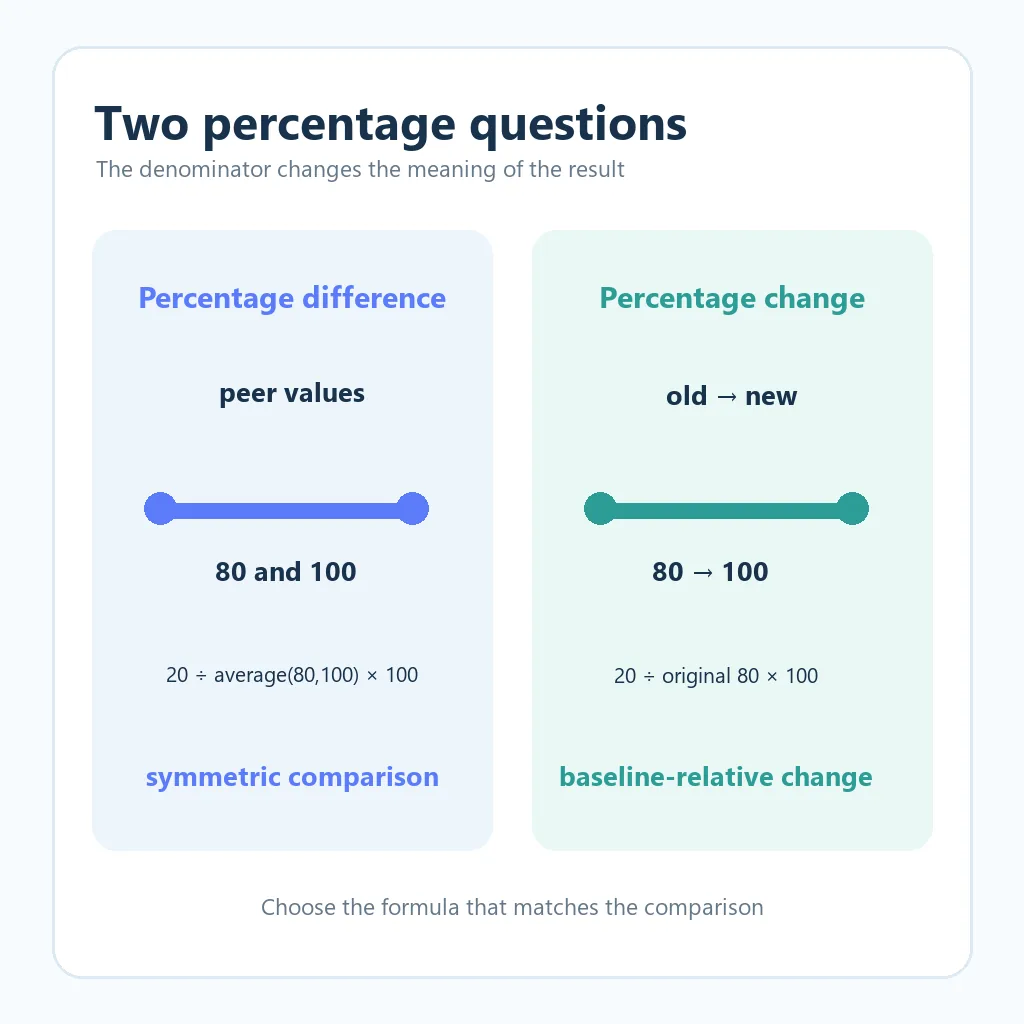
These terms are related, but they answer different questions. Percentage difference is symmetric and uses the average of the two values. Percentage change is directional and uses a specified old, original, or baseline value. If the question says “from 80 to 100,” the old value is 80; if it says “compare two measurements,” neither value may be the baseline.
| Measure | Denominator | 80 and 100 example | Best use |
|---|---|---|---|
| Percentage difference | Average of 80 and 100 = 90 | 20 ÷ 90 = 22.2% | Two peer values |
| Percentage change | Original value = 80 | 20 ÷ 80 = 25% | Old value compared with new value |
| Percentage increase | Starting value = 80 | Increase of 25% | A directional rise |
| Percentage-point change | No average; subtract rates | 4% to 5% = 1 point | Two percentage rates |
For a price that rises from $80 to $100, the percentage increase is 25%, not 22.2%, because the $80 price is the baseline. Use the site's percentage increase formula guide when the comparison has a clear starting point. For adjacent reporting periods, the month-over-month calculation guide explains why the previous month is the denominator.
When the values are already percentages, be careful with the wording. A conversion rate moving from 4% to 5% is a change of 1 percentage point, and it is also a 25% relative increase from the original 4% rate. The two statements are not interchangeable in a report.
How to calculate percentage difference in Excel or Google Sheets
Put the first value in cell A2 and the second value in B2. The following formula returns a decimal that can be formatted as a percentage:
=IF(AVERAGE(A2,B2)=0,"N/A",ABS(A2-B2)/AVERAGE(A2,B2))- Enter the two values in
A2andB2using the same unit. - Enter the formula in another cell, such as
C2. - Format
C2as Percentage and select the desired decimal places. - Copy the formula down only after checking that each row contains two valid values.
For 80 in A2 and 100 in B2, the formula returns 22.22% when the cell is formatted as a percentage. If you leave the result as a plain number, multiply the formula by 100 instead and add a percent sign in the label. Do not multiply by 100 and also apply percentage formatting, or the displayed number will be 100 times too large.
Blank cells deserve a separate check in a production worksheet because AVERAGE can ignore blanks. If both inputs must be present, use =IF(COUNT(A2:B2)<>2,"N/A",IF(AVERAGE(A2,B2)=0,"N/A",ABS(A2-B2)/AVERAGE(A2,B2))). A documented “N/A” is safer than silently treating missing data as zero.
Zero, negative, and unusual values
If both values are zero, the average is zero and the formula has no valid denominator. Report the comparison as N/A or “no measurable difference from a zero baseline,” depending on the context. Do not force the result to 0% just because the two inputs match; the formula is undefined even though the raw difference is zero.
If one value is zero and the other is not, the formula may produce a large but finite result. Comparing 0 and 40 gives an average of 20 and a percentage difference of 200%. That number describes the formula, but it may not be the clearest business explanation. Show the raw values and explain that one measurement is at zero.
Negative values need extra care. The absolute difference still gives a positive gap, but the average can be negative or close to zero. Signed financial values, temperature readings, and accounting adjustments may require a domain-specific convention. If the average is zero or nearly zero, avoid presenting an unstable percentage; report the absolute difference and state the limitation.
Rounding is another source of confusion. Calculate with the stored values and round only the final display. If the original inputs were already rounded, mention that limitation when a small gap matters. A difference of 0.1 may be meaningful in one measurement system and ordinary rounding noise in another.
A reliable reporting checklist
- Label Value A and Value B and write the units beside them.
- Decide whether the values are peers or an old-to-new sequence.
- For peer values, calculate the absolute difference and their average.
- Check whether the average is zero or close enough to make the rate unstable.
- Keep full precision until the final percentage is rounded.
- Report the raw difference together with the percentage and one sentence of context.
Following this sequence makes a result easier to audit in a spreadsheet, a report, or a meeting. If the comparison is really a sale price, use the site's percentage-off formula guide because a discount has a clear original-price baseline.
FAQ: percentage difference formula
What is the simplest percentage difference formula?
Subtract the two values, take the absolute difference, divide by their average, and multiply by 100: |A − B| ÷ ((A + B) ÷ 2) × 100.
Is percentage difference the same as percentage change?
No. Percentage difference uses the average of two peer values and is symmetric. Percentage change uses a specified original or baseline value and is directional.
What is the percentage difference between 80 and 100?
The absolute difference is 20 and the average is 90, so 20 ÷ 90 × 100 = 22.22%, or about 22.2%.
How do I calculate percentage difference in Excel?
With the values in A2 and B2, use =IF(AVERAGE(A2,B2)=0,"N/A",ABS(A2-B2)/AVERAGE(A2,B2)) and format the result cell as a percentage.
Can percentage difference be more than 100%?
Yes. If one value is zero and the other is positive, the average may make the result 200% or another large value. Show the original values because the percentage alone can be hard to interpret near zero.
What happens when both values are zero?
The average is zero, so the standard formula is undefined. Use N/A or a documented domain-specific label rather than inventing a percentage.
Summary
The percentage difference formula is |A − B| ÷ ((A + B) ÷ 2) × 100. It is designed for a symmetric comparison where neither value is automatically the baseline. Use percentage change or percentage increase when the question has a clear old-to-new direction, and use percentage points when both numbers are rates. Check the denominator, keep the raw difference visible, and handle zero or unusual values explicitly.